Greenlit Finish
From raw take to finished master, in your DAW.
A plugin that runs inside your DAW: VST3 and AU on Mac, VST3 on Windows. Step through a real narration and hear every move.
Greenlit Finish

SpecACX Audiobook
Clean
Clears mouth sounds and background noise before Finish starts.
High-Pass
Cuts rumble and thumps below your voice.
Off.
Floor
Turns down the background hiss between words.
Off.
De-Ess
Softens sharp S and SH sounds.
Off.
Tone Match EQ
Shapes the tone of your voice against finished audiobooks.
Off.
Compressor
Evens out the loud and quiet syllables so Level can lift the whole read.
Off.
Level
Sets how loud the recording is. The peak ceiling is always held.
Off.
- Clean, off
- High-Pass, off
- Floor, off
- De-Ess, off
- Tone Match EQ, off
- Compressor, off
- Level, off
Meter
ACX Audiobook
Reads your level, true peak and noise floor against your delivery spec's limits.
−31.3 dBBelow the ACX window
−10.1 dBTPPasses ACX
−65 dBPasses ACX
The take as recorded at home: it reads −31.3 dB RMS, below the level ACX asks for, and the meter shows where it stands.
Headphones recommended.
Narration: Melissa Chavarro, recorded at home.
What it does
High-Pass
Cuts rumble and thumps below your voice.
Floor
Turns down the background hiss between words.
De-Ess
Softens sharp S and SH sounds.
Tone Match EQ
Shapes the tone of your voice against finished audiobooks.
Compressor
Evens out the loud and quiet syllables so Level can lift the whole read.
Level
Sets how loud the recording is. The peak ceiling is always held.
Meter + Advisor
Reads your level, true peak and noise floor against your delivery spec's limits.
Snap and Match
Every module proposes a setting for your voice.
Save your settings as a preset and load it on every chapter, so the whole book sounds the same. Match sets each chapter's level to your spec.
Simple and Advanced
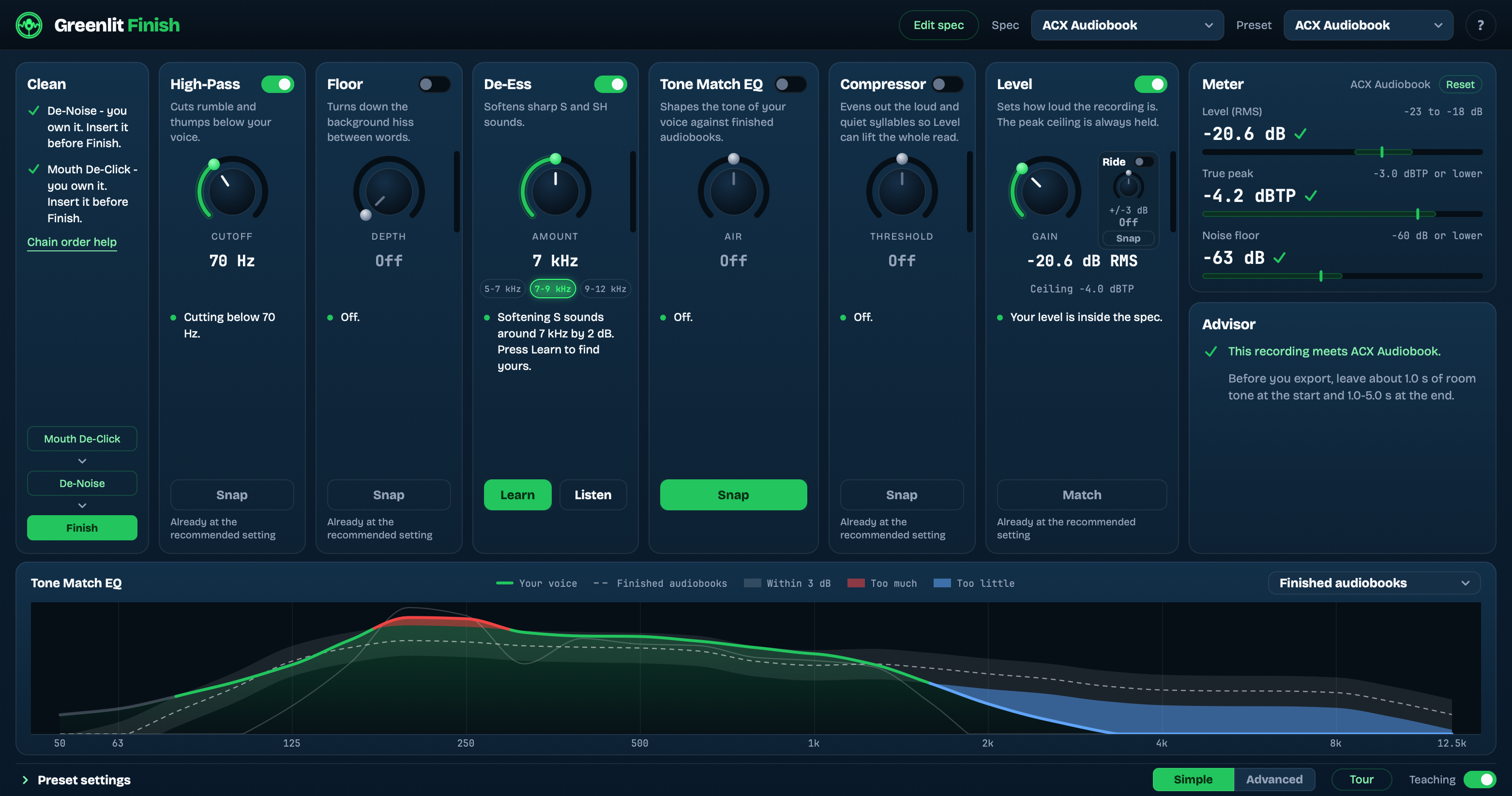
Simple: one main control per module, and Snap does the rest.
Any publisher's spec, not just ACX.
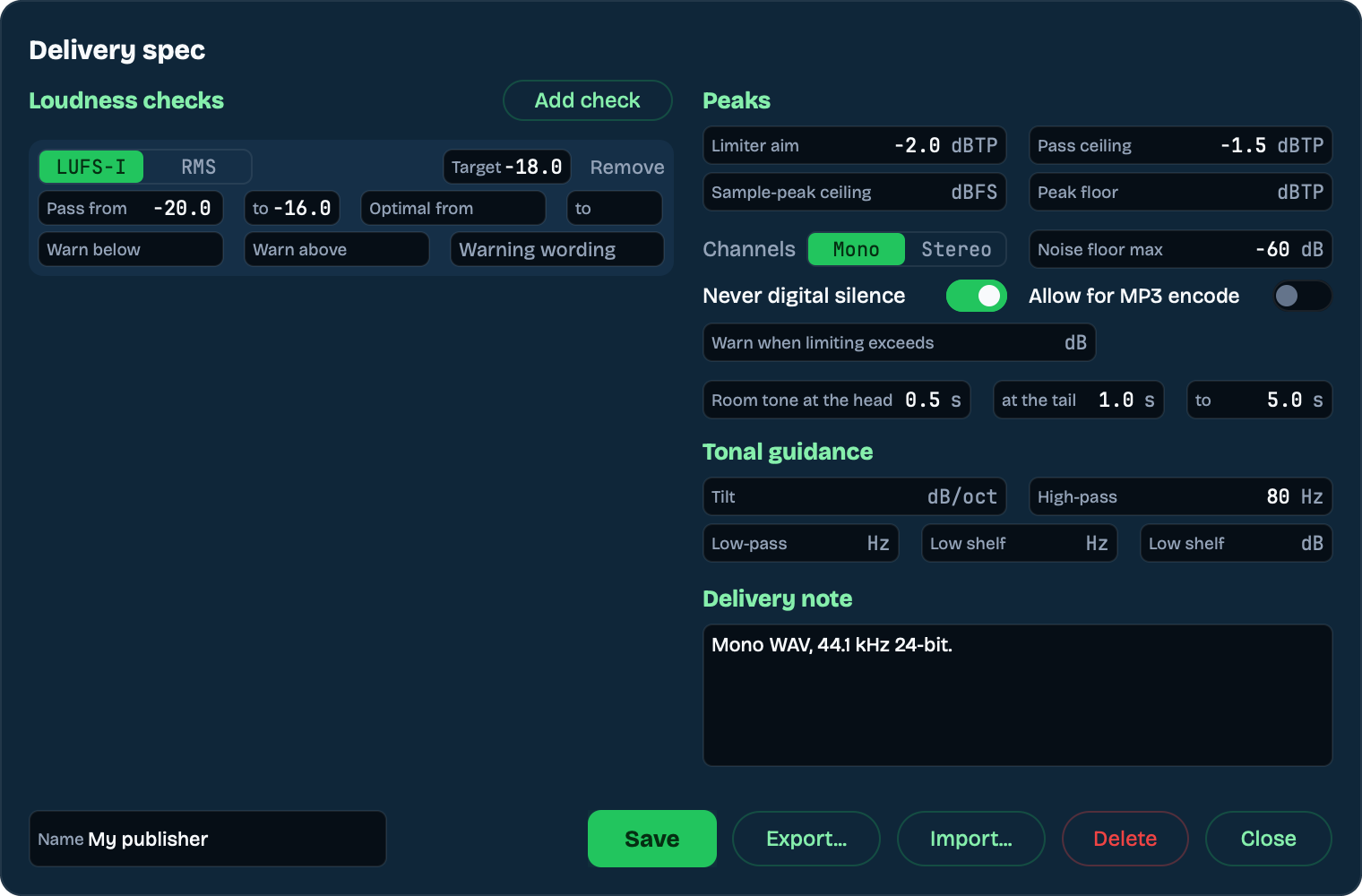
Set up your publisher's delivery spec once. Finish grades every take against it, and Match aims your level at its target.
- Up to four loudness checks, each in LUFS-I or RMS on the ITU or AES scale, with a pass window and warning bands that show your publisher's own wording. Match aims at the first check's target.
- Peaks: a true-peak ceiling in dBTP, a sample-peak ceiling in dBFS, a peak floor and where the limiter aims.
- Mono or stereo, a noise floor maximum, never digital silence, and the room tone wanted at the head and tail.
- Tonal guidance (tilt, high-pass, low-pass, low shelf) that shapes the EQ curve your voice is drawn against.
- A delivery note, shown in the Advisor when a take passes.
Export a spec file and share it with your producer, or import theirs.
Built in: ACX Audiobook, Broadcast Commercial and Agency / Corporate VO. Make a Custom copy of any of them to start from.
Greenlit Finish
Perpetual licence. All version 1 updates free.
Greenlit Suite
Mouth De-Click Pro, De-Noise and Finish. Three keys, one purchase.
Launch price through November 30.
Already own Mouth De-Click Pro or De-Noise? Sign in and you pay only for what you're missing.
Download the demo
Without a licence key, Finish runs in demo mode and drops back to your unprocessed audio every half minute or so. Paste a key and it never happens again. The download needs a free Greenlit account.
Chain order, setup, activation and troubleshooting live on the Finish help page.
Requirements
- VST3 and AU on macOS; VST3 on Windows.
- macOS 13.3 (Ventura) or later.
- 44.1 kHz and 48 kHz sessions. Other rates are refused rather than processed wrong, so set the session to one of those before you record.