How to Remove Mouth Clicks From Audiobook Narration
July 14, 2026 · 6 min read
Search "how to fix mouth clicks in an audiobook" and you'll find the same advice repeated everywhere: drink more water, back off the mic, keep your mouth slightly open. After years doing professional audio post-production QC for major audiobook publishers, my honest take is that none of it holds up. Mouth noise will always creep in no matter what you do — it's a physical reality of talking for an hour or more, not a technique problem you can hydrate your way out of. The other piece of standard advice — if it's already recorded, re-record it, because nothing can fix mouth noise without hurting the performance — used to be true. It isn't anymore, and treating it as gospel sends narrators back into the booth for a problem that no longer requires a full re-take.
Mouth clicks were one of the most common reasons a finished file bounced back for another editing pass during my QC years. They're small — a lip smack, a tongue click, a wet saliva pop between words — but they're exactly the kind of thing a human reviewer's ear snags on, even when every meter on the file reads clean.
What Are Mouth Clicks in Audiobook Narration?
Mouth clicks are the transient noises your mouth makes that have nothing to do with speech: lips separating, saliva popping, a tongue click before a hard consonant. They live in the same short, sharp frequency territory as other clicks and pops, which is why they get lumped in with general "declicking" — but they have their own signature, usually concentrated above 2kHz, sitting right in the range where the ear is most sensitive to anything sharp and unnatural.
They're worse for audiobook narrators than for other voice work for one simple reason: audiobooks run for hours, in a quiet room, with nothing else in the mix to cover for them. A click that would vanish under a podcast's background music or a commercial's sound design is fully exposed in a solo narration track.
Why Mouth Clicks Get Audiobooks Rejected by ACX
ACX's automated checks measure things like RMS, noise floor, and peak level — none of which catch a mouth click. Clicks get flagged in human QC, the pass where a reviewer is listening on headphones for anything that pulls attention away from the story. A file can pass every number on the spec sheet and still come back with a note about "distracting mouth noise throughout." That mismatch — clean meters, rejected file — is what sends a lot of narrators looking for answers in the wrong place, because the automated report gave them no warning at all.
Can You Fix Mouth Clicks Without Re-Recording?
Yes, but not with a blanket noise reduction pass, and not by ear alone at normal playback speed — both miss too much or damage the voice around it. What actually works is treating mouth click removal as its own detection problem, separate from background hiss or hum, because clicks and voice occupy overlapping frequency space at the exact moment the click happens.
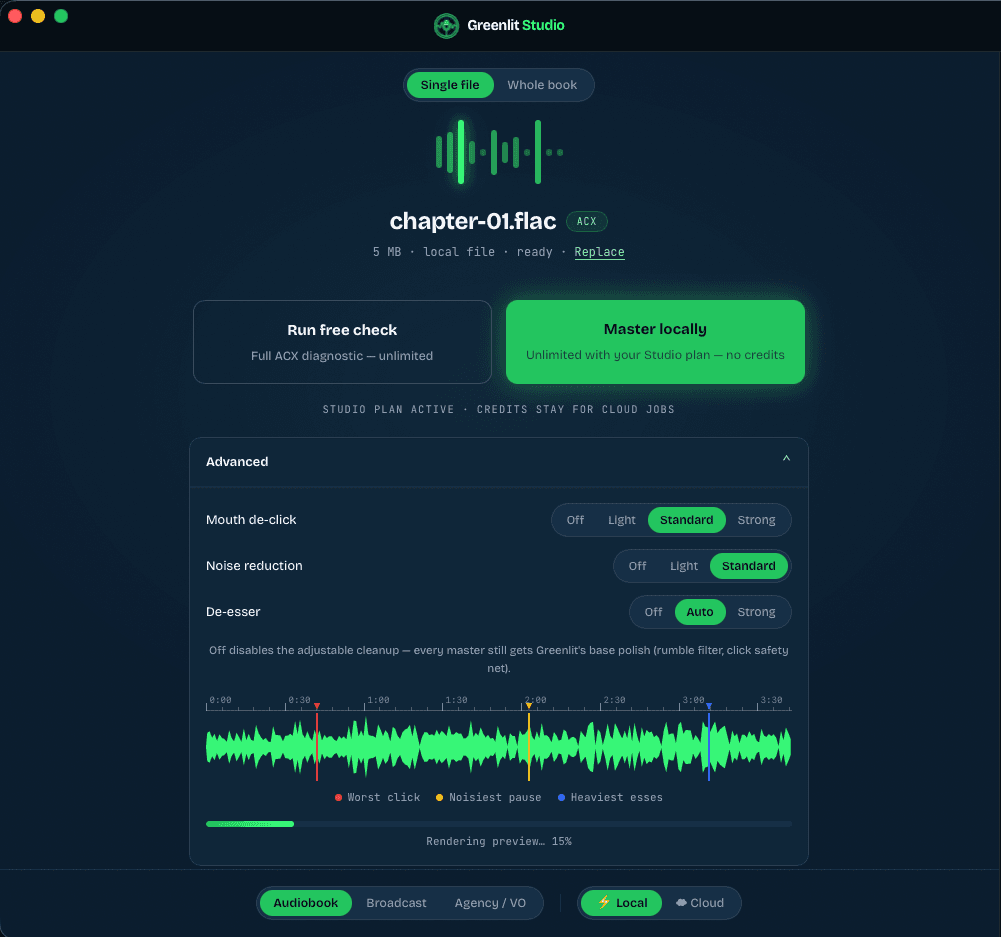
That's the approach behind Greenlit's mouth de-click stage: a dedicated detector trained specifically to recognize the sound signature of clicks and lip smacks, paired with a repair step that works on the frequency bands above roughly 2kHz — where clicks live — rather than touching the track broadly. The repair also caps how aggressively it can act on any single spot, so a genuinely loud click gets tamed without shaving the natural texture off nearby consonants. It runs in Greenlit's cloud processing pipeline and in Greenlit Studio, our desktop app, where narrators can dial the strength — Off, Light, Standard, or Strong — depending on how heavy the mouth noise is on a given session. Standard is the default, and it's tuned for the click density we saw most often in professional QC: present, but not constant.
Why One De-Click Pass Isn't Always Enough
Something worth knowing if you're comparing tools: a single de-click pass can miss clicks that are technically audible but sitting close to other events in the audio — masked just enough to slip past a detector tuned for isolated clicks. Noise reduction also changes what's audible in a track, which is why choosing the right noise reduction for a voice take is part of the same problem: a click that was partially buried under hiss becomes more noticeable once that hiss is cleaned up, and a detector that only runs before the noise pass will have already missed it.
This is exactly why Greenlit's pipeline runs a second de-click pass after noise reduction, not just before it — and Greenlit Studio's desktop app runs the same two-pass detection, so narrators get the same result whether they're processing in the browser or locally on their machine. It's a small architectural detail, but it's the difference between catching the clicks that show up on a first listen and catching the ones a reviewer finds on a second pass with headphones on.
Manual Editing vs. Automated Mouth De-Click Detection
Manual mouth click removal — zooming into the waveform and hand-editing each spot — still has its place, especially for a handful of severe clicks in an otherwise clean file. But it doesn't scale to a full audiobook. Even a careful, well-prepped narrator will typically land somewhere between a couple dozen and a hundred mouth-noise events in a single finished chapter, honestly — and on one of the worst offenders I ever handled in my QC years, I spent a couple of hours on just one chapter, cleaning the clicks one by one. Hand-editing at that volume, across a whole book, is exactly the kind of repetitive, error-prone work that used to eat hours of professional QC time per title. Automated detection isn't about replacing a trained ear — it's about handling the volume so that ear can spend its time on the handful of edge cases that actually need a human decision.
How to Check Your File for Mouth Clicks Before You Submit
You don't need to guess whether your file has a mouth noise problem before you send it to ACX. Greenlit's free diagnostic checks your file against all nine ACX spec points — with no account required. It won't tell you how many mouth clicks are in the take: clicks aren't one of ACX's measurable specs, so the free check doesn't scan for them and no honest count exists on that path. If cleanup is needed, the same detection and repair engine that runs in the cloud is available through Greenlit Studio for narrators who want to keep source files local, or through paid processing for a submission-ready master. Either way, run the free check before you second-guess a whole session and head back into the booth.
Frequently asked questions
Does Greenlit Audio remove mouth clicks?
Yes. Greenlit Audio detects and reduces mouth clicks, lip smacks, and tongue clicks as part of every paid master — it's built into the cleanup pass, not a separate tool you run before or after. The engine has a dedicated mouth de-click stage: a detector trained to recognize the sound signature of clicks and lip smacks, paired with a repair step that works in the frequency range above roughly 2kHz where those sounds live, so a click gets tamed without shaving the natural texture off the words around it. The same engine runs in Greenlit Studio, our Mac and Windows desktop app, and in the Greenlit VST3 plugin for Reaper and Audacity.
Does Greenlit Audio have a mouth de-clicker, or do I need iZotope RX?
Greenlit Audio has its own mouth de-click stage built into the master, so you don't need a separate tool to clean up mouth noise. RX is a strong manual editor if you want to hunt down individual clicks by hand. Greenlit takes the opposite approach: you upload the finished take, the detector finds and repairs the clicks automatically across a whole chapter or a whole book, and the file gets mastered to ACX spec in the same pass. Greenlit's de-click repair was tuned against iZotope RX — the tool most narrators reach for — so the result holds up next to a hand-edited file. If you already own RX and like editing by ear, the two aren't mutually exclusive — but you don't need RX to get mouth clicks out of a Greenlit master.
How do I remove lip smacks from my ACX narration?
Upload your edited chapter to Greenlit Audio and run the master, or process it locally in Greenlit Studio. The cleanup pass reduces lip smacks and mouth clicks automatically, then masters the file to ACX's technical spec and hands back a submission-ready 192kbps MP3. In Greenlit Studio's Advanced mode you can set the mouth de-click strength — Off, Light, Standard, or Strong — depending on how heavy the mouth noise is on a given session. Standard is the default and fits most narration. There's nothing to zoom into or edit by hand.
Does the free ACX checker find mouth clicks?
The free diagnostic is a 9-point ACX technical check — loudness, noise floor, true peak, channel format, sample rate, and the rest — with no account required. It's built to tell you whether your file meets ACX's measurable specs, which is a different question from cleaning up mouth noise. Mouth clicks are removed in the paid master and in Greenlit Studio, not by the free check. There's a reason for that split: mouth clicks are the kind of thing ACX's own automated system doesn't measure either — a human reviewer catches them by ear — so the fix belongs in the processing step, not the report. Run the free check to confirm your specs, then process the file to clean up the clicks.
Can I remove mouth clicks without uploading my audio anywhere?
Yes — that's Greenlit Studio, the desktop app for Mac and Windows. It runs the same mouth de-click and mastering engine on your own machine, so the audio never leaves your computer; only a small job report of measured numbers is sent back. Studio also includes a VST3 plugin, so you can clean up mouth clicks right inside Reaper or Audacity. It's built for NDA work and high-volume studios that can't upload client files.
Will removing mouth clicks damage my narration?
It shouldn't, and that's the whole reason the de-click stage is targeted rather than a blanket noise pass. It works only in the frequency range where clicks live and caps how hard it can act on any single spot, so a loud click gets tamed without dulling the consonants around it. Greenlit also runs a second de-click pass after noise reduction, because cleaning up background hiss can expose a click that was partly buried before. If you want more or less, Greenlit Studio's Advanced mode lets you set the strength yourself and preview the result before you commit.
See how your files measure up
Upload a chapter and get a 9-point ACX compliance report in under a minute — free, no account required.
Run a free analysis →