The Best Noise Reduction Plugin for Voice Recording
September 9, 2026 · 6 min read
Search for the best noise reduction plugin and you get a list built for music production: drum bleed, amp hiss, a snare mic picking up the hi-hat. Voice is a different job. One person, one microphone, one room, for hours — and a listener wearing headphones in a quiet house who will hear every second of that room.
I spent years doing audio post-production QC for audiobook publishers, which mostly meant listening to other people's rooms. Fridge hum. A furnace two floors down. The whine of a laptop fan the narrator genuinely could not hear anymore, because nobody can hear their own room after ten minutes. Auditory adaptation is that good, and microphones don't have it.
So this post is about noise reduction for voice specifically: what separates a plugin that works on narration from one that merely works, why most of them ask you for something they shouldn't need, and why I think Greenlit De-Noise is the best de-noise plugin for voice right now — including the places where it is the wrong tool and something else wins.
What “Best” Means for Voice, and Why It's Not What It Means for Music
A noise reduction plugin aimed at a full mix can afford to be a little destructive. There are twenty other things playing. Nobody is going to isolate the hi-hat and listen to what happened to its tail.
A solo narration track has nowhere to hide. Every artifact the plugin creates is fully exposed, in the clear, for eight hours. That changes what “best” means to three specific things:
- It cannot touch the voice. Consonants are broadband transients — an “S”, a “T”, a hard “K” look a lot like noise to anything measuring energy across frequency. A plugin that trims them leaves you with a clean-sounding recording of a slightly muffled person.
- It has to work when the noise moves. Room tone is not one constant sound. The AC cycles. A fan spins up. Traffic passes. The room itself warms through a three-hour session and the HVAC responds to it.
- It has to survive a long session, unattended. Anything requiring you to re-tune per chapter is not a workflow, it's a second job.
Why Noise Profiles Are the Wrong Model for a Voice Take
Most noise reduction you have used works by subtraction. You find a patch of silence, the plugin captures a noise profile — a noise print, a fingerprint, whatever the manual calls it — and then it subtracts that shape from everything after it. Audacity's Noise Reduction works this way. So does Adobe Audition's Noise Reduction. So does the classic spectral de-noise workflow in most repair suites.
It is a reasonable idea and it fails on narration for reasons that have nothing to do with the quality of the plugin.
The profile has to be clean, and yours usually isn't. You need a stretch of genuine room tone with no breath, no chair creak, no page turn. Let a quiet breath into the profile and you have taught the plugin that breath is noise — so it subtracts breath-shaped energy from every word you speak for the rest of the chapter.
The profile goes stale. A profile captured in minute one describes minute one. By minute forty the compressor kicked on, the fan changed speed, and you are now subtracting the wrong shape from your voice. This is the single biggest reason a file sounds fine at the top of a chapter and hollow at the end of it.
Push it and you get the underwater sound. When you ask spectral subtraction for more reduction than the signal supports, it starts removing narrowband energy that was never really noise, and what is left rings — the metallic, watery, chirping quality engineers call musical noise. Once you hear it you cannot stop hearing it, and neither can a reviewer with headphones on.
The Best De-Noise Plugin for Voice: Greenlit De-Noise
Greenlit De-Noise never asks for a profile, because it does not work by subtraction. It runs a speech model — DeepFilterNet3 — trained on voices and on noise, so it already knows what a human voice sounds like and what does not. You point it at a track and it separates the two, continuously, frame by frame. There is no silent patch to find and nothing to capture.
That single design decision is what fixes the failure above. Moving noise is handled by construction rather than by you noticing and re-capturing. A fan cycling mid-paragraph is just a different frame. So is a punch-in recorded on a different day, in a room that sounds slightly different, which is the case that breaks profile-based cleanup most reliably and most invisibly.
It is also not a plugin built to a spec sheet and shipped. It is the same noise-reduction engine that runs on every file Greenlit masters, in Greenlit Studio and the web version — tuned against audiobook narration, which is the most exposed, least forgiving voice material there is.
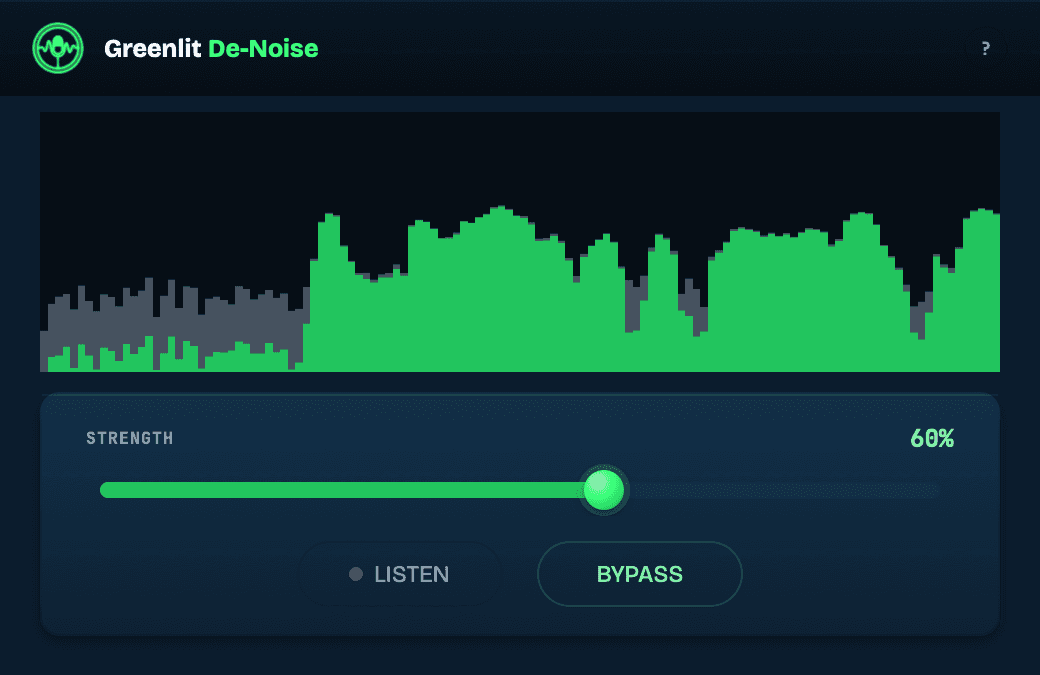
There are three controls, and the second one is the one that matters most:
- Strength — how much of the reduction to apply. The default is deliberately gentle. Push it for a noisier room.
- Listen — audition only what is being removed. This is the feature most plugins bury and it is the only honest way to work: if you can hear your voice in the residual, you have gone too far. Back the Strength off until the residual is just room.
- Bypass — a true, sample-exact bypass, so an A/B tells you something real instead of a level difference.
How It Compares to iZotope RX, Waves Clarity Vx and Audacity
Naming a best only means something if you say what it is better than, and at what.
- iZotope RX is the deepest audio repair suite there is, and nothing here replaces it. If you need spectral surgery on a single event, harmonic de-humming, ambience matching or a full standalone editor, RX is the tool and it is worth its price. It is also a suite priced and built for a post house, and most narrators are buying all of it to use one module of it.
- Waves Clarity Vx is the closest thing in kind — also a speech model, also profile-free, also good. The difference is what it was tuned for: a broad dialogue-and-streaming brief versus narration specifically, with an ACX-spec master waiting on the other end of the same engine.
- Audacity's built-in Noise Reduction is free and profile-based. It is fine for a rough podcast and it is exactly what you are hearing when a voice recording sounds underwater. If Audacity is your editor, De-Noise loads in it as a VST3.
- Adobe Audition gives you both Noise Reduction and Adaptive Noise Reduction. Adaptive is the better of the two for voice because it tracks change over time instead of freezing one profile — but it is still spectral subtraction, and it lives inside a subscription.
- A noise gate is not noise reduction and should not be used as it. It removes noise between words and leaves it untouched underneath them, which is why gated narration breathes in and out. A downward expander is the safer version of the same idea, and it is worth understanding the difference before you reach for either.
What Greenlit De-Noise Doesn't Do
The fastest way to be wrong about a best is to leave this part out.
It does not load in Pro Tools. Pro Tools only accepts AAX plugins; De-Noise ships VST3 and AU. It runs in Logic, REAPER, Audition, Studio One, Audacity and Ableton Live, on macOS 13.3 or newer and on Windows. If Pro Tools is your only DAW, this is not your plugin and no version of it will be.
It runs at 44.1 kHz and 48 kHz only. Sessions at any other rate are refused rather than processed wrong, which is deliberate — quietly resampling your master behind your back is a worse outcome than a clear no.
It reports about 1.6 seconds of latency. The engine listens ahead before it decides, your DAW compensates, and bounces come out perfectly aligned. During live playback you will see the cursor running ahead of the audio, which is the host showing you that compensation. It is a post plugin, not a tracking plugin.
It does not touch mouth clicks, lip smacks, plosives or sibilance. Those are a different problem with a different fix, and a broadband noise pass is the wrong instrument for all of them.
And it will not rescue a take where the room is competing with the voice. If your noise floor is close enough to your narration that removing it takes the narration with it, the answer is the room or the microphone, not a plugin. Measure before you decide.
Will It Get You Past the ACX Noise Floor?
ACX requires a noise floor below −60 dBFS, and room tone is the single most common reason a file misses it. Broadband reduction is exactly the move that shifts that number, so yes — this is the tool for that specific rejection.
The caveat is that ACX measures the file you deliver, not the plugin you used. Reduce, then verify. Greenlit's free diagnostic checks a file against all nine ACX spec points, including the noise floor, with no account required — which is a better use of ten minutes than guessing, and considerably better than finding out from a rejection email a week later.
Try It Before You Buy It
The download is the full-quality engine, not a crippled preview. Without a licence key it runs in demo mode: every so often the noise audibly comes back for a few seconds, then processing resumes. That is enough to hear precisely what it does to your own voice in your own room, on your own material, which is the only test that settles this question. A free Greenlit account gets you the download.
Greenlit De-Noise is $59 at the founding price and increases to $79. It is a one-time purchase, not a subscription. The licence key is bound to your account email rather than to a machine, so it installs on every computer you use, and there is no activation server to phone home to. All version 1 updates are free, including compatibility fixes for new macOS, Windows and DAW releases.
Frequently asked questions
What is the best noise reduction plugin for voiceover?
For voiceover and narration specifically, the deciding factor is whether the plugin needs a noise profile. Anything that asks you to capture a patch of silence is describing the room at one moment in time, and a voice session is hours long — the profile is wrong by the end of it. Greenlit De-Noise runs a speech model instead, so it separates voice from background continuously with nothing to capture. iZotope RX remains the deepest repair suite if you need spectral surgery and a standalone editor; Waves Clarity Vx is the closest comparable speech-model plugin. For a solo voice track being mastered to spec, De-Noise is built for exactly that job.
Does Greenlit De-Noise need a noise profile or noise print?
No. It never asks for one. Most noise reduction learns the noise from you — you find a silent patch, it captures a profile, and it subtracts that shape from everything after. De-Noise is a model trained on speech and noise, so it already knows what a voice sounds like and what does not. You put it on the track and it separates the two. There is no silent patch to find, nothing to re-capture when the fan changes, and no profile to go stale halfway through a chapter.
Is there a good free noise reduction plugin for voice?
Audacity's built-in Noise Reduction is free and it is profile-based, which makes it usable for a rough podcast and risky for narration — pushed hard, it produces the metallic, watery artifact people describe as sounding underwater. If you want to hear what a speech model does to your own voice without paying first, Greenlit De-Noise's demo is the full-quality engine: the noise audibly returns for a few seconds every so often, and nothing else is held back. That is a more useful free test than a limited-quality trial, because you are hearing the real result on your real material.
Does Greenlit De-Noise work in Pro Tools?
No. Pro Tools only loads AAX plugins, and De-Noise ships as VST3 and AU. It runs in Logic, REAPER, Adobe Audition, Studio One, Audacity and Ableton Live — VST3 and AU on macOS 13.3 or newer, VST3 on Windows. If you work in Pro Tools, the same engine is still available to you outside the DAW: Greenlit Studio is a Mac and Windows desktop app that runs it on a finished file locally, and the web version does it in the browser.
Will noise reduction make my voice sound processed?
It can, and the way to know is to listen to what is being removed rather than to what is left. De-Noise has a Listen control that auditions the residual on its own. If you hear your voice in there — consonants, breath, the top of an “S” — the Strength is too high, so bring it down until the residual is just room. The default setting is deliberately gentle for this reason. The failure mode people associate with noise reduction, that hollow underwater quality, comes from asking for more reduction than the recording supports; the residual tells you where that line is before you commit to it.
Can noise reduction fix an ACX noise floor rejection?
Usually, yes — room tone above −60 dBFS is the most common cause of that particular rejection, and broadband noise reduction is the move that addresses it directly. What it cannot fix is a room loud enough that removing the noise takes the voice with it; at that point the answer is acoustic treatment or a different microphone position, not a plugin. Either way, measure the delivered file rather than assuming. Greenlit's free 9-point ACX check reads the noise floor on the actual file you are about to submit, with no account required.
Hear it on your own voice
Greenlit De-Noise is a VST3 and AU plugin for macOS and Windows. The demo is the full-quality engine — the noise comes back for a few seconds every so often, and nothing else is held back.
Try Greenlit De-Noise →