Know you're on ACX spec while you record
A live meter for the three acoustic ACX checks — peak, RMS, and noise floor — right in your DAW. Recording mode projects where your noise floor will land after mastering, so you know the take is usable before you leave the booth.
Free with a Greenlit account. Runs fully offline — no network, no telemetry, your audio never leaves the DAW.
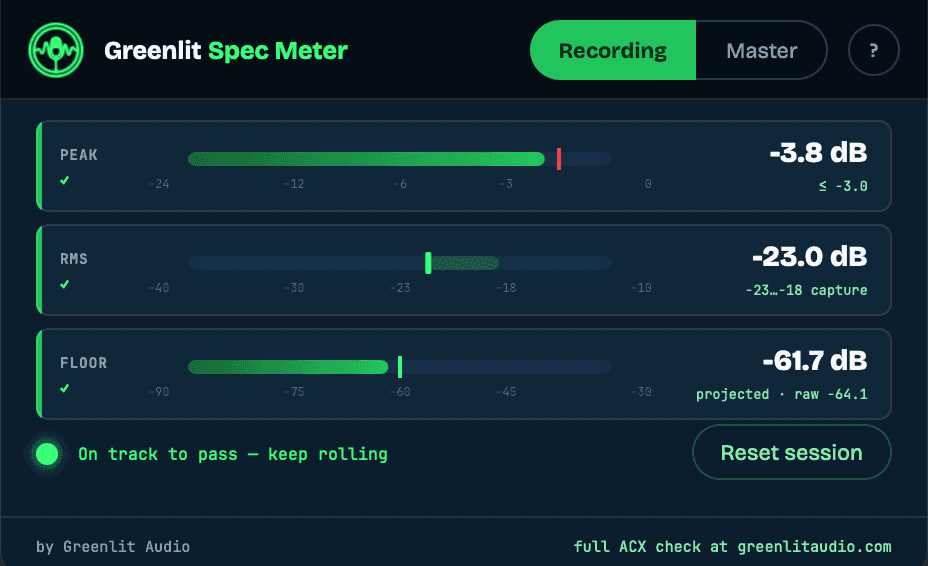
Recording mode — the one that saves retakes
Watch a projected post-mastering noise floor while you track. Room tone that reads too hot raw often masters to well under -60 dB — and sometimes the reverse. The projection tells you which booth you're actually in before you record forty chapters there.
Master mode — the literal spec
Peak ≤ -3 dB, RMS between -23 and -18 dB, noise floor ≤ -60 dB — read live against your finished master, with a per-check pass lamp.
Pure passthrough
The Spec Meter never touches your audio — bit-identical in and out. It listens, measures, and stays out of the signal path's way. Reaper, Logic Pro, Audacity, GarageBand, any VST3 or AU host.
Questions
Is it really free?
Yes. Create a free Greenlit account, download, done. No credits, no trial clock, no watermark — the meter is free outright.
Does it upload my audio anywhere?
No. The plugin makes zero network calls — it runs fully offline. Everything is measured inside your DAW and nothing leaves it.
Recording mode says my floor is fine but the raw meter reads hot. Which is right?
Both. Recording mode projects where the floor lands after Greenlit's mastering chain, which is the number ACX actually hears. The raw reading is what your booth sounds like before any processing.
Is this the same as the free web check?
Different jobs. The web version analyzes a finished file and reports every ACX check, including format and head/tail room tone. The Spec Meter reads the acoustic numbers live while you work. Use the meter in the booth, the web check before you submit.
Which DAWs and formats?
VST3 and AU on macOS (Intel and Apple Silicon), VST3 on Windows. Reaper, Logic Pro, Audacity, GarageBand, and any other VST3/AU host.
Auditioning? Make it sound finished.
The meter shows where your recording stands. Greenlit cleans it up and masters it to spec — an audition, a chapter, or a whole book. Your free files cover the first few.
Already installed? Setup & help →·Noise under the voice? See Greenlit De-Noise →