Greenlit De-Noise
Noise reduction for voice, in your DAW
The same noise-reduction engine Greenlit Studio and the web version master with, as a VST3 and AU plugin. Room tone, hiss, HVAC and computer fans under a voice — gone, with the voice left alone. Audiobook chapters, broadcast spots, corporate reads, auditions: same problem, same fix.
VST3 + AU on macOS · VST3 on Windows
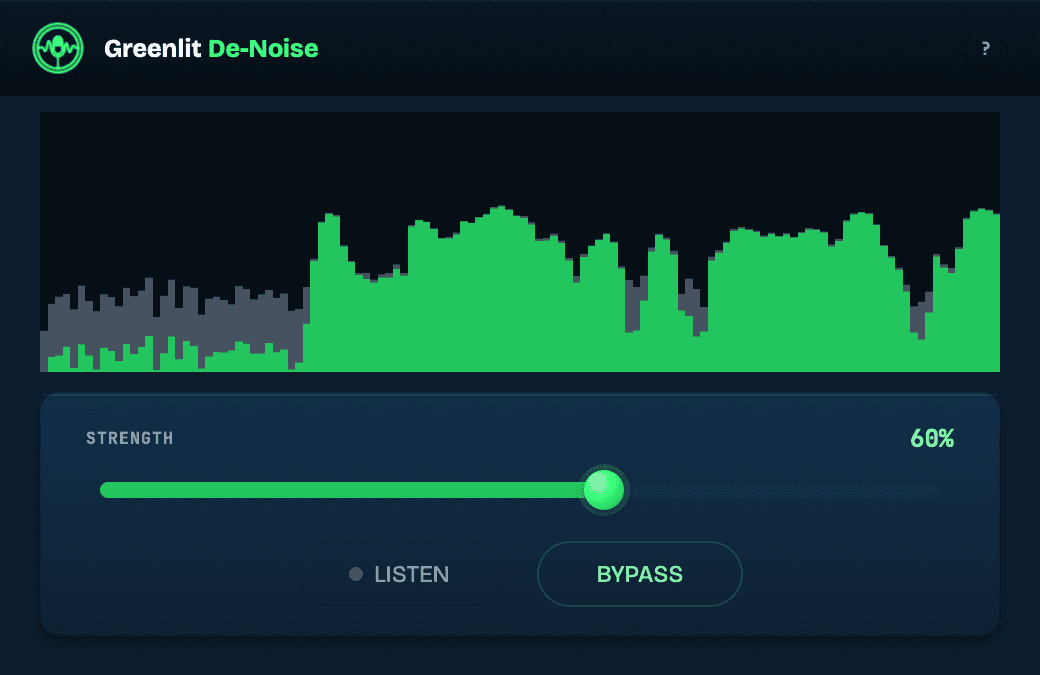
The noise you stop hearing and your listener doesn't
You stop hearing your own room after ten minutes. The hiss, the air conditioner, the fan under every line — it is still in the file, and it is the difference between a take that sounds finished and one that sounds like a spare bedroom. On an audition it is the first thing anyone hears.
De-Noise runs the same speech model the Greenlit mastering pass uses. It separates voice from background and takes the background down, conservatively by default.
Three controls
- Strength — how much of the reduction to apply. The default is deliberately gentle; push it for noisier rooms.
- Listen — hear only what is being removed, so you can check the voice is not in it.
- Bypass — a true, sample-exact bypass for A/B.
Hear it on a real recording
Usually, the material is sent to another studio for the necessary processing, but I wanted to hear the results of the plugin’s noise reduction. Honestly, I was amazed at how user-friendly it is and how it cleans up the vocal take without introducing strange artifacts.
Andrés Amaya
Colombia
The take is his. There is a coffee thresher running in the room behind the voice — the kind of broad mechanical noise that sits on top of a read rather than under it. Same take three times, at the same volume, so the only thing changing is the noise.
Strength 60 is the gentle end of the control and already takes the room out. Push it to 100 and more of the noise goes; listen to what happens to the voice between the two.
Try it before you buy it
Download and use the full-quality engine now. Without a licence key the plugin runs in demo mode: every so often the noise audibly comes back for a few seconds, then processing resumes. Paste a key and it never happens again. The download needs a free Greenlit account.
Setup, activation and troubleshooting live on the De-Noise help page.
Greenlit De-Noise
Increases to $79 — buy at the founding price now.
De-Noise + Mouth De-Click Pro
Increases to $129. Both plugins, both keys, one purchase.
Already own Mouth De-Click Pro? Sign in and complete the bundle for $40 — either button takes you there. Own De-Noise and want Pro? The same $40 applies on the Mouth De-Click Pro page.
Buy once
All updates to version 1 are free, including compatibility fixes for new macOS, Windows and DAW releases. If there is ever a version 2, owners get a substantial discount.
Questions
How is this different from other noise reduction?+
Most noise plugins learn the noise from you. You find a patch of silence, capture a noise profile, and the plugin subtracts that shape from everything after it. That works until the noise moves — a fan cycling on, traffic, a room that changes through a long session. De-Noise never asks for a profile. It is a model trained on speech and noise, so it already knows what a voice sounds like and what does not. Point it at a track and it separates the two. Nothing to capture, no silent patch to find.
Which formats and DAWs?+
VST3 and AU on macOS (13.3 or newer); VST3 on Windows. Any host that loads those formats — Logic, REAPER, Audition, Studio One, Audacity, Ableton Live. There is no plan for other plugin formats.
Which sample rates?+
44.1 kHz and 48 kHz. Sessions at other rates are refused rather than processed wrong, so set the session to one of those before you record.
Why does my DAW show a delay?+
The engine listens ahead to make its decisions, so the plugin reports about 1.6 seconds of latency and your DAW compensates for it. Bounces and renders come out perfectly aligned; during playback you may notice the cursor a little ahead of the audio, which is the host showing that compensation, not a fault.
How does the licence key work?+
Your key is bound to your account email, not to a machine — install on as many of your own computers as you use. There is no activation server: paste the key once and the plugin checks it locally. Lost the email? The key is always on your account page.
I own Greenlit Studio. Do I need this?+
Studio already runs this engine on every file it masters. De-Noise is for using it live inside your DAW; it is a separate purchase.